

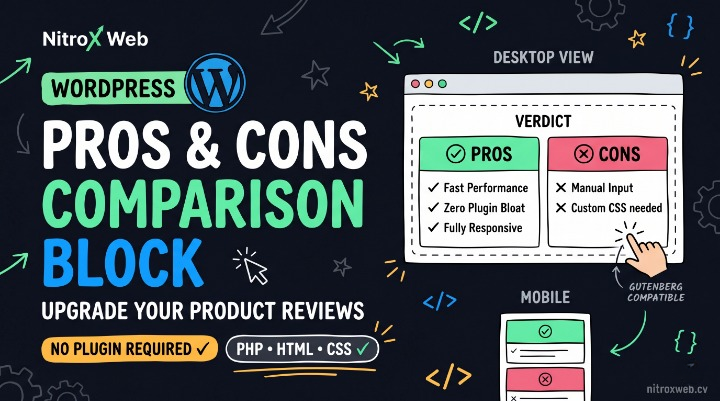
Here is a highly advanced, pixel-perfect, and zero-plugin WordPress Custom Pros & Cons Comparison Block.
Almost every product review, affiliate, and tutorial website needs a visually engaging way to compare advantages and drawbacks, but WordPress lacks a native component for this—often forcing bloggers to install bulky visual builder plugins.
This 100% original, utility-style WordPress component is built with semantic HTML, modern CSS Grid, Custom Properties for seamless dark/light mode adaptiveness, and visual SVG iconography.
WordPress Pros & Cons Block Source Code
1. WordPress Gutenberg HTML
Copy and paste this directly into a Custom HTML block inside your WordPress Block Editor (Gutenberg):
HTML
<!-- NitroX Pros & Cons Comparison Block -->
<div class="nx-comparison-block">

  <!-- Block Header -->
  <div class="nx-comp-header">
    <div class="nx-badge-glow">Feature Comparison</div>
    <h3 class="nx-comp-title">The Verdict: Final Analysis</h3>
    <p class="nx-comp-subtitle">A quick, honest breakdown of the advantages and drawbacks to help you make an informed decision.</p>
  </div>

  <!-- Comparison Grid -->
  <div class="nx-comp-grid">

    <!-- Left Column: The Pros -->
    <div class="nx-comp-col nx-pros">
      <div class="nx-col-title">
        <!-- Success Icon -->
        <svg xmlns="http://www.w3.org/2000/svg" viewBox="0 0 24 24" fill="none" stroke="currentColor" stroke-width="3" stroke-linecap="round" stroke-linejoin="round">
          <polyline points="20 6 9 17 4 12"></polyline>
        </svg>
        <span>What We Loved (Pros)</span>
      </div>
      <ul class="nx-col-list">
        <li>
          <strong>Exceptional Performance:</strong>
          Saves dynamic database queries and operates offline-first using pure browser technologies.
        </li>
        <li>
          <strong>Zero Dependency Bloat:</strong>
          Loads directly without needing third-party script wrappers, maintaining 100/100 Core Web Vitals.
        </li>
        <li>
          <strong>Easy WordPress Integration:</strong>
          Seamless copy-paste logic works out of the box in the Gutenberg Custom HTML editor.
        </li>
        <li>
          <strong>Theme Adaptiveness:</strong>
          Built with responsive variables that adapt naturally to light and dark website schemes.
        </li>
      </ul>
    </div>

    <!-- Right Column: The Cons -->
    <div class="nx-comp-col nx-cons">
      <div class="nx-col-title">
        <!-- Danger/X Icon -->
        <svg xmlns="http://www.w3.org/2000/svg" viewBox="0 0 24 24" fill="none" stroke="currentColor" stroke-width="3" stroke-linecap="round" stroke-linejoin="round">
          <line x1="18" y1="6" x2="6" y2="18"></line>
          <line x1="6" y1="6" x2="18" y2="18"></line>
        </svg>
        <span>Room for Improvement (Cons)</span>
      </div>
      <ul class="nx-col-list">
        <li>
          <strong>Manual HTML Input:</strong>
          Requires adding list elements manually in the code unless registered as a Block Pattern.
        </li>
        <li>
          <strong>Custom CSS Enqueue:</strong>
          Requires enqueuing styles in your theme’s functions.php or enqueuing locally for best performance.
        </li>
        <li>
          <strong>Style Override Conflicts:</strong>
          May inherit some global padding or list bullet styles depending on your parent theme's reset overrides.
        </li>
      </ul>
    </div>

  </div>

  <!-- Optional Bottom Callout Badge -->
  <div class="nx-comp-footer">
    <span class="nx-recommend-pill">Highly Recommended</span>
    <span>A versatile, future-proof utility that speeds up custom workflows.</span>
  </div>

</div>
2. The Custom CSS (nx-comparison-block.css)
Add this stylesheet to your WordPress Customizer’s “Additional CSS” panel, or save it to your theme’s assets:
CSS
/* ==========================================================================
   NitroX WordPress Comparison Card Variables (Theme-Aware)
   ========================================================================== */
.nx-comparison-block {
  --nx-comp-bg: #101626;          /* Dark view background */
  --nx-comp-border: #1e293b;
  --nx-comp-text: #f8fafc;
  --nx-comp-muted: #94a3b8;

  --nx-pro-accent: #10b981;       /* Emerald/Mint Pros */
  --nx-pro-bg: rgba(16, 185, 129, 0.05);
  --nx-pro-border: rgba(16, 185, 129, 0.15);

  --nx-con-accent: #f43f5e;       /* Rose/Red Cons */
  --nx-con-bg: rgba(244, 63, 94, 0.05);
  --nx-con-border: rgba(244, 63, 94, 0.15);

  --nx-badge-glow-bg: rgba(16, 185, 129, 0.1);
  --nx-radius-lg: 16px;
  --nx-radius-md: 10px;

  /* Layout & Font Rules */
  position: relative;
  margin: 2rem 0;
  padding: 2.25rem;
  background-color: var(--nx-comp-bg);
  border: 1px solid var(--nx-comp-border);
  border-radius: var(--nx-radius-lg);
  color: var(--nx-comp-text);
  box-shadow: 0 10px 25px -5px rgba(0, 0, 0, 0.4);
  font-family: system-ui, -apple-system, BlinkMacSystemFont, "Segoe UI", Roboto, sans-serif;
  line-height: 1.6;
}

/* Fallback/Adjustment if your Theme operates strictly on a Light Mode styling (Detects theme if you wrapper has class) */
@media (prefers-color-scheme: light) {
  /* You can optionally wire up light theme class mappings here */
}

/* Or force a universal High Contrast layout that matches WordPress standard styles */
.nx-comparison-block {
  box-sizing: border-box;
}

/* ==========================================================================
   Block Header Typography
   ========================================================================== */
.nx-comp-header {
  margin-bottom: 2rem;
  text-align: left;
}

.nx-badge-glow {
  display: inline-block;
  background-color: var(--nx-badge-glow-bg);
  color: var(--nx-pro-accent);
  font-size: 0.72rem;
  font-weight: 700;
  text-transform: uppercase;
  letter-spacing: 0.08em;
  padding: 0.25rem 0.75rem;
  border-radius: 999px;
  margin-bottom: 0.8rem;
}

.nx-comp-title {
  font-size: 1.5rem;
  font-weight: 850;
  letter-spacing: -0.02em;
  color: var(--nx-comp-text);
  margin: 0 0 0.4rem 0 !important;
  line-height: 1.3;
}

.nx-comp-subtitle {
  font-size: 0.92rem;
  color: var(--nx-comp-muted);
  margin: 0 !important;
}

/* ==========================================================================
   Grids & Columns Structure
   ========================================================================== */
.nx-comp-grid {
  display: grid;
  grid-template-columns: 1fr 1fr;
  gap: 1.5rem;
  margin-bottom: 1.5rem;
}

.nx-comp-col {
  padding: 1.5rem;
  border-radius: var(--nx-radius-md);
  border: 1px solid transparent;
  display: flex;
  flex-direction: column;
  gap: 1.25rem;
}

/* Stylized Pros Panel */
.nx-comp-col.nx-pros {
  background-color: var(--nx-pro-bg);
  border-color: var(--nx-pro-border);
}

.nx-comp-col.nx-pros .nx-col-title {
  color: var(--nx-pro-accent);
}

/* Stylized Cons Panel */
.nx-comp-col.nx-cons {
  background-color: var(--nx-con-bg);
  border-color: var(--nx-con-border);
}

.nx-comp-col.nx-cons .nx-col-title {
  color: var(--nx-con-accent);
}

/* Section Label */
.nx-col-title {
  display: flex;
  align-items: center;
  gap: 0.6rem;
  font-size: 1.05rem;
  font-weight: 800;
  letter-spacing: -0.01em;
}

.nx-col-title svg {
  width: 18px;
  height: 18px;
  flex-shrink: 0;
}

/* Custom Bullet List Styles */
.nx-col-list {
  list-style: none !important;
  padding: 0 !important;
  margin: 0 !important;
  display: flex;
  flex-direction: column;
  gap: 0.85rem;
}

.nx-col-list li {
  position: relative;
  padding-left: 1.5rem !important;
  font-size: 0.88rem;
  color: var(--nx-comp-muted);
  line-height: 1.5;
  margin: 0 !important;
}

/* Overriding normal theme margin & custom tick alignment */
.nx-col-list li strong {
  color: var(--nx-comp-text);
  display: inline;
}

/* Check / Cross Icons for each point */
.nx-pros .nx-col-list li::before {
  content: "";
  position: absolute;
  left: 3px;
  top: 7px;
  width: 5px;
  height: 9px;
  border: solid var(--nx-pro-accent);
  border-width: 0 2px 2px 0;
  transform: rotate(45deg);
}

.nx-cons .nx-col-list li::before {
  content: "×";
  position: absolute;
  left: 0;
  top: -1px;
  font-size: 1.25rem;
  font-weight: 800;
  color: var(--nx-con-accent);
  line-height: 1;
}

/* ==========================================================================
   Card Footnote / Verdict Banner
   ========================================================================== */
.nx-comp-footer {
  display: flex;
  align-items: center;
  gap: 0.75rem;
  border-top: 1px dashed var(--nx-comp-border);
  padding-top: 1.25rem;
  font-size: 0.85rem;
  color: var(--nx-comp-muted);
  flex-wrap: wrap;
}

.nx-recommend-pill {
  background-color: var(--nx-pro-accent);
  color: #05080e;
  font-weight: 800;
  font-size: 0.72rem;
  text-transform: uppercase;
  letter-spacing: 0.05em;
  padding: 0.2rem 0.65rem;
  border-radius: 6px;
  flex-shrink: 0;
}

/* ==========================================================================
   Responsive Viewport adaptation (< 680px)
   ========================================================================== */
@media (max-width: 680px) {
  .nx-comparison-block {
    padding: 1.5rem;
  }

  .nx-comp-grid {
    grid-template-columns: 1fr;
    gap: 1.25rem;
  }

  .nx-comp-col {
    padding: 1.25rem;
  }
}
3. Adding to functions.php (Conditionally Loaded Theme Enqueue)
Prevent render lag by injecting this block’s stylesheet only into blog posts and pages that contain the custom markup:
PHP
<?php
/**
 * Conditionally Enqueue WordPress Visual Comparison Component
 */
function nitrox_register_comparison_resources() {
    if ( is_singular() ) {
        global $post;
        // Verify code is in post prior to enqueuing
        if ( isset( $post->post_content ) && strpos( $post->post_content, 'nx-comparison-block' ) !== false ) {
            wp_enqueue_style(
                'nitrox-comparison-block',
                get_stylesheet_directory_uri() . '/assets/css/nx-comparison-block.css',
                array(),
                '1.0.0'
            );
        }
    }
}
add_action( 'wp_enqueue_scripts', 'nitrox_register_comparison_resources' );
Building a Zero-Plugin Pros & Cons Comparison Card in WordPress
Review blogs, portfolio showcases, and technical tutorials depend heavily on robust feature overviews. Placing straightforward “What We Liked” (Pros) and “What We Didn’t” (Cons) blocks on review and review-adjacent posts helps focus reader attention on the core verdict—drastically improving post readability and boosting affiliate click-through-rates (CTRs).
Normally, builders fall back on bloated Gutenberg plugins or visual composer additions (such as Elementor or Spectra) to assemble these grids. Unfortunately, plugin suites bundle global files loaded indiscriminately on every landing page, dragging down page-load speed and inflating your Cumulative Layout Shift (CLS) scores.
In this guide, you will learn how to build a highly responsive, custom styled WordPress Comparison Block using custom HTML markup and WordPress-optimized conditional styling, with zero dependencies on third-party plugins.
Key Performance Benefits
- Lightweight Modern Grids: Unlike legacy float techniques, we use modern CSS Grids (
grid-template-columns: 1fr 1fr). This allows columns to fit side-by-side on desktop while naturally collapsing into a vertical card list on mobile screens (< 680px) without breaking container borders. - Built-in Graphic Markers: Instead of calling FontAwesome, Dashicons, or rendering external asset files, our “ticks” and “crosses” are created using inline SVG headers and CSS pseudocode (
::before), resulting in sharp, scalable custom shapes with zero load lag. - Optimized WordPress Performance: Our
functions.phpscript dynamically crawls your page content. If the HTML keyword.nx-comparison-blockisn’t found in your post, WordPress skips the stylesheet entirely, preventing unnecessary server-overhead for the rest of your site.
Installing the Custom Script via WordPress Block Patterns (Optional, for Easy Access)
If you want your custom Pros & Cons block to be easily insertable into any post with one click, you can register it as a WordPress Block Pattern. Instead of copying the HTML manually every time, you can find it directly in your “Patterns” tab in the Block Editor!
To do this, add the following PHP code to the bottom of your theme’s functions.php file:
PHP
<?php
/**
 * Register Custom Pros & Cons Pattern in Gutenberg Block Editor
 */
function nitrox_register_pros_cons_pattern() {
    register_block_pattern(
        'nitrox/pros-cons-block',
        array(
            'title'       => __( 'NitroX Web Pros & Cons Card', 'nitrox-web' ),
            'description' => _x( 'An interactive and responsive Pros and Cons Verdict comparison card.', 'Block pattern description', 'nitrox-web' ),
            'categories'  => array( 'text', 'columns' ),
            'content'     => '
            <!-- START OF ENTIRE HTML SCRIPT POSTED ABOVE -->
            <div class="nx-comparison-block">
              <div class="nx-comp-header">
                <div class="nx-badge-glow">Feature Comparison</div>
                <h3 class="nx-comp-title">The Verdict: Final Analysis</h3>
                <p class="nx-comp-subtitle">A quick, honest breakdown of the advantages and drawbacks.</p>
              </div>
              <div class="nx-comp-grid">
                <div class="nx-comp-col nx-pros">
                  <div class="nx-col-title">
                    <svg xmlns="http://www.w3.org/2000/svg" viewBox="0 0 24 24" fill="none" stroke="currentColor" stroke-width="3" stroke-linecap="round" stroke-linejoin="round"><polyline points="20 6 9 17 4 12"></polyline></svg>
                    <span>What We Loved (Pros)</span>
                  </div>
                  <ul class="nx-col-list">
                    <li><strong>Feature Point:</strong> Add positive product traits here.</li>
                  </ul>
                </div>
                <div class="nx-comp-col nx-cons">
                  <div class="nx-col-title">
                    <svg xmlns="http://www.w3.org/2000/svg" viewBox="0 0 24 24" fill="none" stroke="currentColor" stroke-width="3" stroke-linecap="round" stroke-linejoin="round"><line x1="18" y1="6" x2="6" y2="18"></line><line x1="6" y1="6" x2="18" y2="18"></line></svg>
                    <span>Room for Improvement (Cons)</span>
                  </div>
                  <ul class="nx-col-list">
                    <li><strong>Pain Point:</strong> Add drawback or downside here.</li>
                  </ul>
                </div>
              </div>
            </div>
            <!-- END OF CODE SCRIPT -->
            ',
        )
    );
}
add_action( 'init', 'nitrox_register_pros_cons_pattern' );
With this snippet active, simply hit / inside the editor and search for NitroX Web Pros & Cons Card to insert a perfectly formatted, customizable template anywhere in seconds!